

Technical
How to claim and set up your business on ChatGPT, step by step
Claiming a profile is mostly paperwork, and the paperwork has an order. Do it in the wrong sequence and you stall at the identity check with a half-finished feed. This is the order that avoids that.
On this page
Who can claim a profile?
The owner or an authorised representative of a business can claim it. Press reports say that at launch the business needs a website, and that it must be in a market where ChatGPT operates and the verification steps are supported. No country list has been published in anything we could read, so confirm availability in the claim flow rather than assuming it.
Local stores and restaurants are handled differently from online businesses. Coverage says a local business can claim an existing listing, and only in the United States for now. Online businesses claim by website. If you run both, expect to deal with them separately.
How do the verification routes work?
There are four routes to prove the business is yours. You can confirm by a call or code to the business phone, by an email at the business domain, by adding a DNS TXT record to the domain, or by connecting a Shopify account. Pick the one you can finish in a single sitting. The DNS record is the most reliable if you control the domain, and it is usually a two-minute change for whoever manages your DNS.
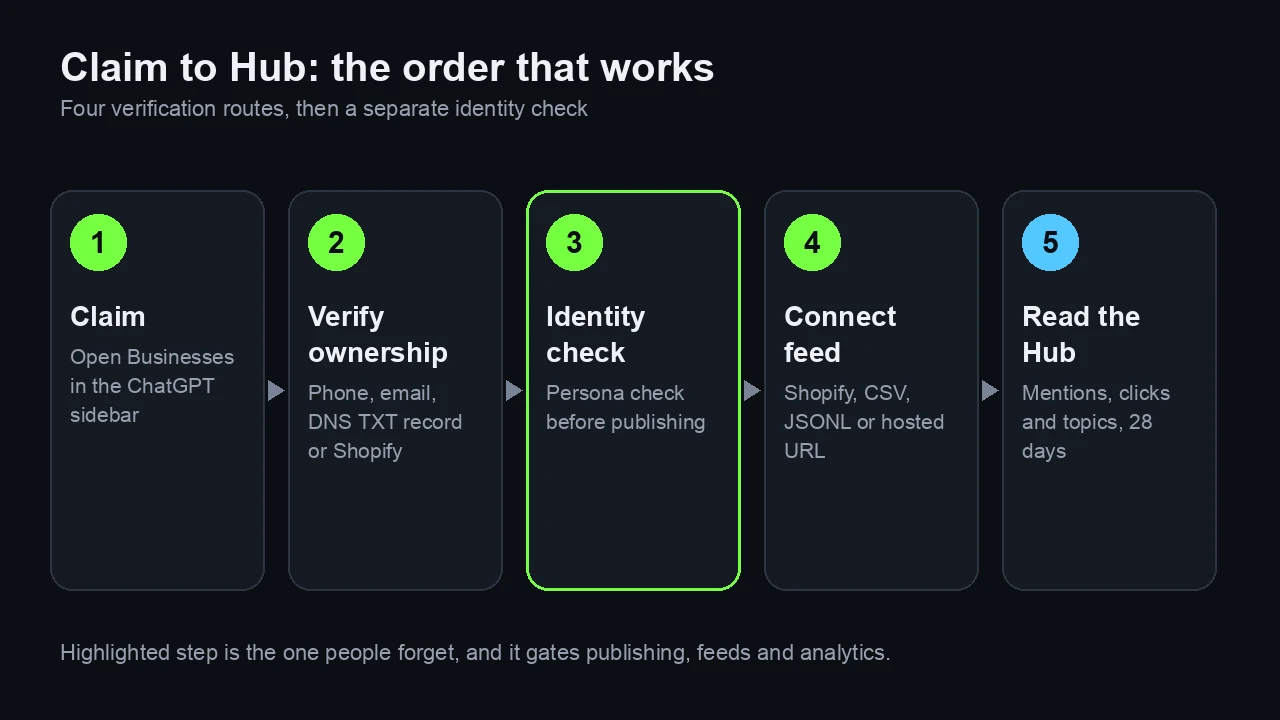
After that comes a second step that people tend to forget: an identity check run by Persona, a verification provider. Reports say it is required before you can publish changes, connect a feed, read the analytics or create an agent, and that the blue verified check appears once it is approved. Another writer reported that it may ask for government ID, business registration and proof of authority, but that is not confirmed by OpenAI in anything we could read, so have a director or owner ready and the registration paperwork to hand.
Related reading: ChatGPT business profiles explained: what launched and what is missing and AI crawlers, robots.txt and llms.txt: what to allow and why.
What does the product feed need?
You can supply products through a Shopify connection, a CSV or similar file that follows OpenAI's product feed specification, or a hosted feed URL. The specification in OpenAI's developer documentation accepts JSONL, CSV and TSV files in UTF-8. Nine fields are required: item_id, title, description, url, brand, seller_name, image_url, availability and price.
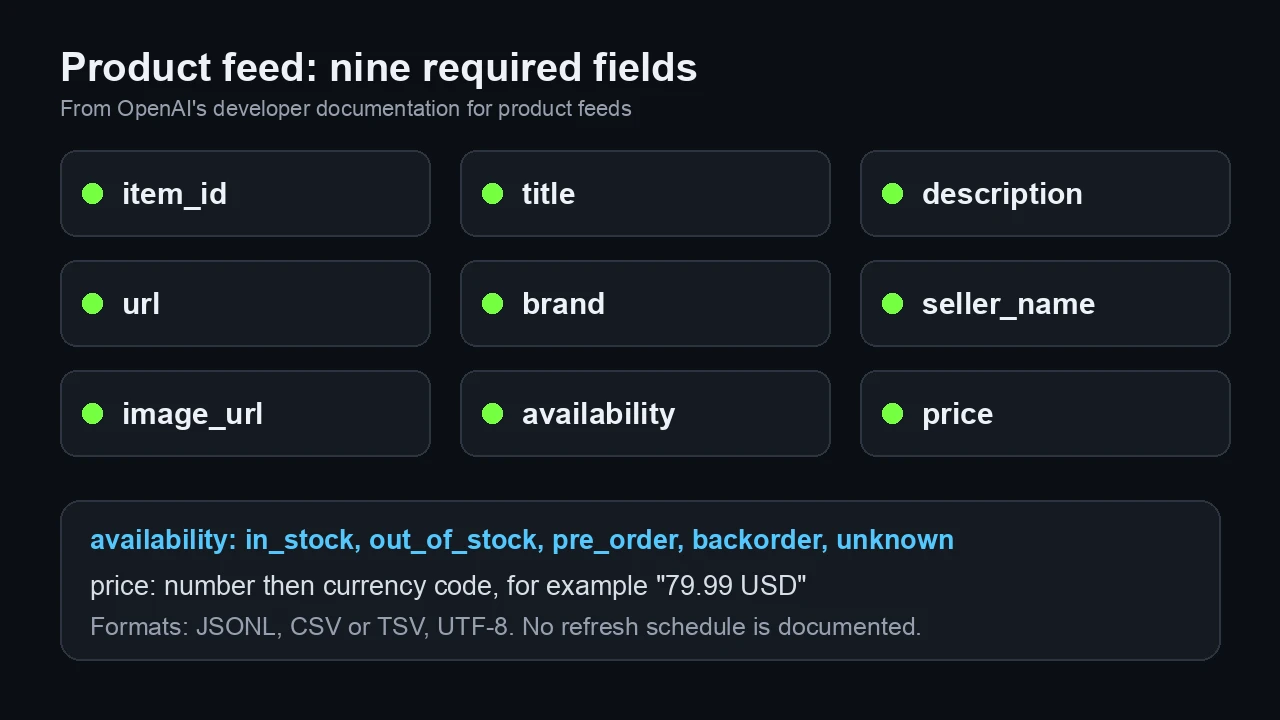
Availability takes one of five values: in_stock, out_of_stock, pre_order, backorder or unknown. Price is written as a number followed by the currency code, for example 79.99 USD. The documentation does not describe a refresh schedule, so assume prices and stock only change when you update the file, and put that on someone's weekly list.
One caution. That specification is the general commerce one, and its listed target countries are the US, Canada and Mexico. We could not confirm that it is exactly the feed used by the Business Hub, so use it as the best available guide and check it against the live setup screen before you build anything large.
What should the profile itself say?
Write the profile for a stranger who has thirty seconds. Say what you sell, who it is for, where you operate, how delivery and returns work and how to reach support. Use the same names for products and plans that appear on your site, because a mismatch between the profile, the feed and the page is the easiest way to get wrong details repeated.
Keep claims you can prove. OpenAI's Business Agents policy, updated on 10 November according to coverage, bars invented prices or reviews and false urgency, and requires the agent to say it is an AI acting for the business. The same discipline is sensible for the profile text, since you will be asked to stand behind it.
What should you check before and after publishing?
Before you publish: confirm the domain you verified is the one on your listings, check that every required feed field is filled for every item, make sure prices include the same taxes your site shows, and confirm that crawlers can reach your pages. OpenAI documents OAI-SearchBot as the crawler that decides whether a page can appear in ChatGPT search answers, while GPTBot is for training and ChatGPT-User fetches a page when a person asks for it. Each has its own robots.txt rule, and OpenAI says changes to search-related rules take about 24 hours to apply.
After you publish: ask ChatGPT five questions about your products and compare what it says with your profile. Log the date. Return in two weeks, then at the end of the 28-day window, and compare the Hub's clicks with your own analytics for the same days. Any difference is something to look into rather than a verdict.
Frequently asked questions
How do I verify my business on ChatGPT?
Reports describe four routes: a call or code to your business phone, an email at your business domain, a DNS TXT record on your domain, or a Shopify account connection. A separate Persona identity check follows.
Which fields does the ChatGPT product feed require?
OpenAI's product feed documentation lists nine required fields: item_id, title, description, url, brand, seller_name, image_url, availability and price.
What file formats can I use for the feed?
JSONL, CSV and TSV in UTF-8 according to the specification, or a Shopify connection or hosted feed URL as described in launch coverage.
How often is the feed refreshed?
The documentation we could read gives no refresh schedule, so plan to update prices and availability yourself when they change.
Should I allow OAI-SearchBot?
If you want your pages to be eligible for ChatGPT search answers, yes. OpenAI documents it as the crawler that controls that, separate from GPTBot, which is used for training.
Sources
- OpenAI developer documentation, product feed specification (file upload, products)
- OpenAI developer documentation, crawlers and user agents (GPTBot, OAI-SearchBot, ChatGPT-User)
- VentureBeat, Digiday and Search Engine Roundtable launch coverage, 10 to 11 November 2026
- OpenAI, Introducing Businesses in ChatGPT, 10 November 2026 (as relayed by the press)
Keep reading
Part of our Technical series. Start with AI crawlers, robots.txt and llms.txt: what to allow and why.
See it on your own brand: AI crawler analytics in OClever, or book a demo.